

Connecting to BI Tools
Attest data can be connected to BI tools like Power BI and Tableau. Because the rounds endpoint returns nested JSON, you'll need to prepare the data into a flat table first, then connect your BI tool to that.
Prepare the data
When a BI tool flattens the rounds JSON, answer IDs become column names rather than row values, which makes the data impossible to join or chart meaningfully. To avoid this, transform the rounds data into a flat table that resolves answer IDs to question titles and answer labels, and joins rounds to structure in a single step.
There are a few ways to produce this flat table, depending on your setup.
Prep manually
If your team has data engineers, the rounds response can be transformed using your existing tooling. See guide on combining structure and rounds to analyse results for how the two endpoints relate.
Use Python script
For most teams, the simplest option is to run the script below. It calls both endpoints, joins them, and outputs a single flat CSV. Set your API key and study ID at the top, then run it.
#!/usr/bin/env python3
"""Export a study's answers as a flat table for BI tools (Power BI, Tableau, ...).

Setup:
    pip install requests pandas
    export ATTEST_API_KEY=your_key

Set STUDY_ID below, then run:
    python export_study_answers.py

Writes one row per answer to attest_results.csv.
"""

import csv
import os
import sys

import pandas as pd
import requests

BASE_URL = "https://api.askattest.com/insights/api/v1"
API_KEY = os.environ.get("ATTEST_API_KEY")

# Replace this with the study you want to export.
STUDY_ID = "your_study_id"

# Where the flattened table is written.
OUTPUT_FILE = "attest_results.csv"

HEADERS = {"X-API-Key": API_KEY, "Accept": "application/json"}


def fetch_structure(study_id):
    response = requests.get(f"{BASE_URL}/studies/{study_id}/structure", headers=HEADERS)
    response.raise_for_status()
    return response.json()


def fetch_rounds(study_id, survey_id):
    response = requests.get(
        f"{BASE_URL}/study/{study_id}/rounds",
        headers=HEADERS,
        params={"surveyIds": survey_id},
    )
    response.raise_for_status()
    payload = response.json()
    # The endpoint returns a list of rounds; tolerate a single-object response too.
    return payload if isinstance(payload, list) else [payload]


# The fixed columns written to the CSV, in order. Each key matches a field
# produced by `flatten_round` below. Demographic columns (one per key found
# in `round.demographics` across all rounds) are appended after these, sorted
# alphabetically, since the set of demographic fields varies by study.
CORE_COLUMNS = [
    "study_id",
    "survey_id",
    "survey_title",
    "audience_id",
    "audience_name",
    "country",
    "language",
    "round_id",
    "outcome",
    "card_id",
    "card_title",
    "card_type",
    "field_id",
    "field_text",
    "subject_id",
    "subject_text",
    "answer_id",
    "response_text",
    "sentiment",
    "rank_order",
]


class StructureIndex:
    """Fast lookups over the structure, keyed by the ids that join to round data."""

    def __init__(self, structure):
        self.study_id = structure["studyId"]
        self.surveys_by_id = {survey["id"]: survey for survey in structure.get("surveys", [])}
        self.audiences_by_id = {
            audience["id"]: audience for audience in structure.get("audiences", [])
        }
        self.nodes_by_id = {node["id"]: node for node in structure.get("nodes", [])}

        # Per node: field id -> field label, and subject id -> subject label.
        self.field_labels_by_node = {}
        self.subject_labels_by_node = {}
        for node in structure.get("nodes", []):
            fields = node.get("fields", {}).get("items", [])
            subjects = node.get("subjects", {}).get("items", [])
            self.field_labels_by_node[node["id"]] = {
                field["id"]: field.get("text", "") for field in fields
            }
            self.subject_labels_by_node[node["id"]] = {
                subject["id"]: subject.get("text", "") for subject in subjects
            }


def flatten_round(round_document, structure):
    """Yield one row dictionary per answer in the round, joined to structure labels."""
    survey = round_document.get("survey") or {}
    audience = round_document.get("audience") or {}
    survey_id = survey.get("id")
    audience_id = audience.get("id")
    survey_info = structure.surveys_by_id.get(survey_id, {})
    audience_info = structure.audiences_by_id.get(audience_id, {})

    # Respondent-level demographics (age, gender, ...), separate from the
    # audience-level info above. Keys vary by study, so they're spread out
    # as demo_<key> columns rather than hardcoded.
    demographics = round_document.get("demographics") or {}
    demo_fields = {f"demo_{key}": value for key, value in demographics.items()}

    for card_id, card in (round_document.get("cards") or {}).items():
        node = structure.nodes_by_id.get(card_id, {})
        field_labels = structure.field_labels_by_node.get(card_id, {})
        subject_labels = structure.subject_labels_by_node.get(card_id, {})

        for answer_id, answer in (card.get("answers") or {}).items():
            field_id = answer.get("fieldId")
            subject_id = answer.get("subjectId")
            yield {
                "study_id": structure.study_id,
                "survey_id": survey_id,
                "survey_title": survey_info.get("title"),
                "audience_id": audience_id,
                "audience_name": audience_info.get("name"),
                "country": audience_info.get("country"),
                "language": audience_info.get("language"),
                "round_id": round_document.get("id"),
                "outcome": round_document.get("outcome"),
                "card_id": card_id,
                "card_title": node.get("title"),
                "card_type": node.get("type"),
                "field_id": field_id,
                "field_text": field_labels.get(field_id),
                "subject_id": subject_id,
                "subject_text": subject_labels.get(subject_id),
                "answer_id": answer_id,
                "response_text": answer.get("text"),
                "sentiment": answer.get("sentiment"),
                "rank_order": answer.get("order"),
                **demo_fields,
            }


def main():
    if not API_KEY:
        sys.exit("Set your API key first:  export ATTEST_API_KEY=your_key")
    if STUDY_ID == "your_study_id":
        sys.exit("Set STUDY_ID at the top of the script to the study you want to export.")

    structure = StructureIndex(fetch_structure(STUDY_ID))

    rows = []
    for survey_id in structure.surveys_by_id:
        for round_document in fetch_rounds(STUDY_ID, survey_id):
            rows.extend(flatten_round(round_document, structure))

    # Demographic fields vary by study, so the demo_* columns are discovered
    # from the data rather than hardcoded, then appended after the core columns.
    demo_columns = sorted({key for row in rows for key in row if key.startswith("demo_")})
    columns = CORE_COLUMNS + demo_columns

    answers = pd.DataFrame(rows, columns=columns)
    print(f"Flattened {len(answers)} answer rows x {len(answers.columns)} columns.")
    answers.to_csv(OUTPUT_FILE, index=False, quoting=csv.QUOTE_ALL)
    print(f"Wrote {OUTPUT_FILE}")


if __name__ == "__main__":
    main()
The result is a flat table where each row is one answer from one respondent, with question titles, answer labels, and demographics as columns.
Connect data to Power BI
-
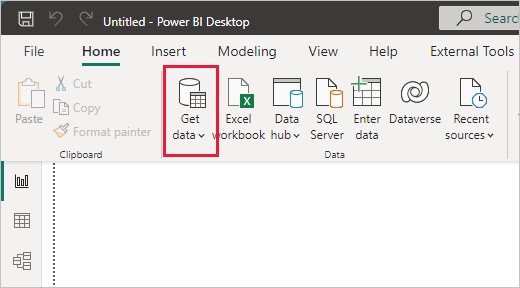
In Power BI Desktop, click Get Data
-
Upload your CSV file or connect to a data warehouse
Connect data to Tableau
-
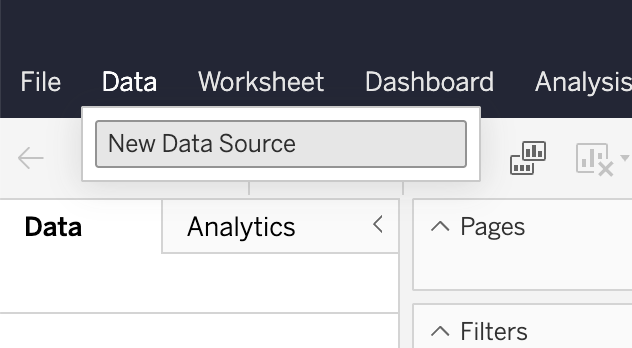
In Tableau, add a new data source
-
Upload your CSV file or connect to a data warehouse
Updated 3 months ago