

Connecting via API
The base URL, endpoint paths, rate limits, and pagination behaviour you need to know before making your first Attest API request.
Base URL
All API requests are made to the following base URL:
https://api.askattest.com/insights/api/v1Append the endpoint path to this base URL for every request. For example:
https://api.askattest.com/insights/api/v1/studies/{studyId}/structure
https://api.askattest.com/insights/api/v1/study/{studyId}/rounds?surveyIds={surveyIds}See the API reference for information on all available endpoints, and read this guide to learn how to use them together to analyse results.
Using your API key
Pass your API key in the X-API-Key header on every request:
X-API-Key: YOUR_API_KEY
For instructions on how to get your API key, see this guide.
Finding your study ID
Both endpoints require a studyId. To find it:
- Go to Attest and open the survey you want
- Check the URL. The study ID is the segment after
/survey/
For example, in this URL the study ID is the {studyId} segment:
https://dashboard.askattest.com/survey/{studyId}/results/overview
Finding your survey ID
A survey ID is required when fetching response data from the rounds endpoint. Each survey targets one audience within a wave, if your study has multiple audiences (e.g. UK and US), each has its own survey ID.
There are two ways to find your survey IDs: from the Attest platform, or from the Structure API.
From the Attest platform
-
Go to Attest and open the survey you want.
-
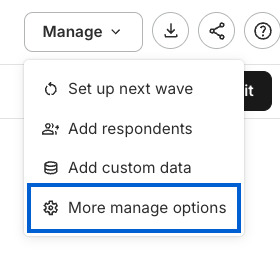
Click Manage on the top right and select More manage options.
-
On the Manage page, select and click the audience that you want to include.
-
On the side panel, scroll down until you see the Survey GUID section. Copy that and add it to the
surveyIdsparams
From the Structure API
Call the Structure endpoint for your study. Each survey object in the response contains an id field — this is your survey ID. For example:
curl -H "X-API-Key: YOUR_API_KEY" \
  "https://api.askattest.com/insights/api/v1/studies/{studyId}/structure?node_ids=none"
Note: The node_ids=none parameter returns only metadata (no question nodes), which keeps the response small when you only need survey IDs.
The response includes a surveys array:
{
  "surveys": [
    {
      "id": "RX8ANVKCKMRD8X",
      "title": "UK Adults",
    }
  ]
}
Pass the id values to the surveyIds parameter on the rounds endpoint:
curl -H "X-API-Key: YOUR_API_KEY" \
  "https://api.askattest.com/insights/api/v1/study/{studyId}/rounds?surveyIds=RX8ANVKCKMRD8X"
To fetch rounds for multiple surveys, pass them as a comma-separated list:
?surveyIds=RX8ANVKCKMRD8X,ANOTHER_SURVEY_IDRate limiting
The API is rate limited to 300 requests per IP address per 5-minute window. If you exceed this, you'll receive a 403 response. When looping over multiple surveys, space your requests out or add a short delay between calls to stay within the limit.
Pagination
The rounds endpoint returns all results in a single response — there is no pagination. For studies with many waves or large audiences, responses can be sizeable, so plan your pipeline accordingly.
What this unlocks
Point Power BI, Tableau, or your own tool at the API and it pulls the latest wave automatically, with no manual export-and-reupload cycle. See Connecting to BI Tools.
Every answer, every demographic, every round, delivered as structured data you can shape however you need: your own cuts, cross-tabs, or models.
Write the pull once and re-run it wave after wave, across as many studies as you like, without re-building a report by hand each time.
Join survey results with CRM, sales, or product analytics in your own warehouse.
Updated 3 months ago